
Per Transaction Limits - ePayPolicy
ePayPolicy enforces per-transaction ACH payment limits, which can be viewed and increased through the user’s dashboard under the Account tab, with no daily limits, to facilitate faster funding by fronting payments, and customer support is available via chat or phone during business hours for assistance.
ePayPolicy Help Center
Accepting a large ACH payment?
ePayPolicy enacts per transaction limits on all accounts. Transaction limits are in place as ePayPolicy front funds ACH payments to speed up the funding process.
What does this mean for your agency? Let’s look at an example. If your single per transaction limit is $15,000 and your client needs to pay an invoice of $15,001 you would first need to increase your limits.
To view your per-transaction limits and/or to request an increase to your limits. Login to your your ePayPolicy dashboard and navigate to the Account tab, as shown below:
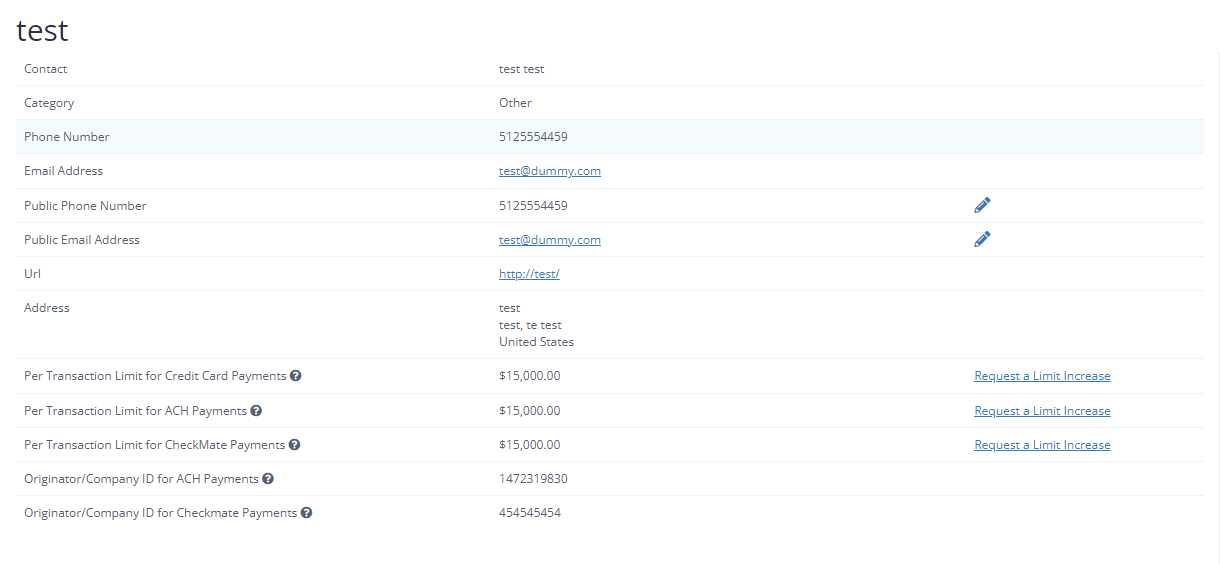
Once you request a limit increase, we will reach out if anything is needed.
Keep in Mind
Limits are per transaction, there is no daily limit.
How can we improve this article?
Inaccurate - doesn't match what I see in the product
Hard to Understand - unclear or translation is wrong
Missing info - relevant but not comprehensive
Irrelevant - doesn’t match the title and / or my expectations
Minor errors - formatting issues, typos, and / or broken links
Other
Share additional info and suggestions
Notify me about changes
Cancel
Contact Us
If you still have questions or prefer to get help directly from an agent, our team can be reached during normal business hours, Monday through Friday 8AM-5PM CST, via the "Let's Chat" feature on the bottom right corner of our website.
If you would prefer to speak to someone via a phone call, during normal business hours, contact our Customer Support team at 844-372-9300.
Let's Chat!
To get started, please tell us a little bit about yourself.
Start Chat