
Updating the phone number and email address for the e-receipt - ePayPolicy
The ePayPolicy Help Center article explains how to update the public-facing phone number and email address on e-receipts by editing these details in the Account menu within the dashboard, provides an illustrative screenshot, invites user feedback for article improvement, and offers customer support contact options including live chat and phone during business hours.
ePayPolicy Help Center
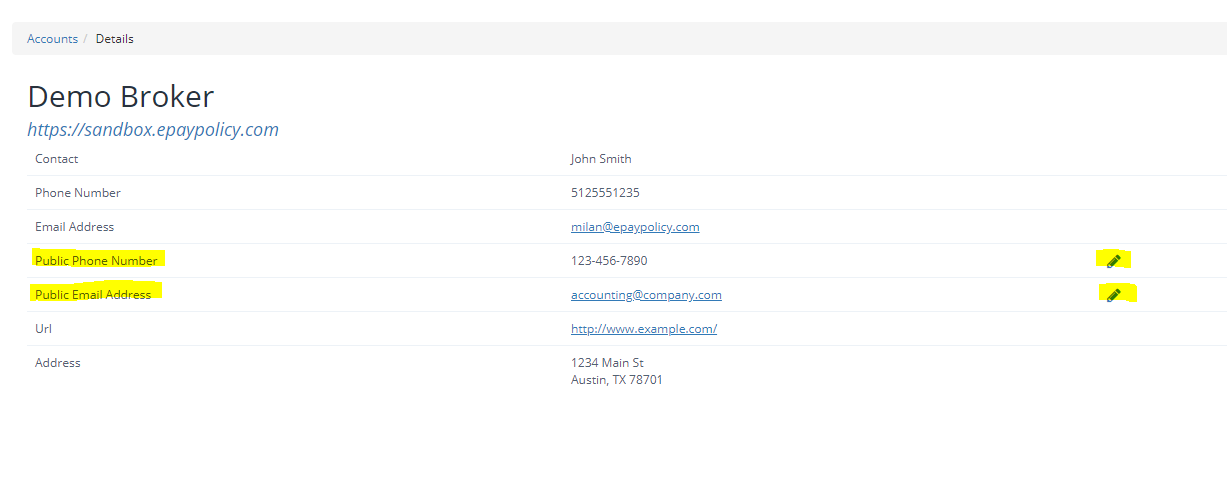
Follow these instructions to update your public-facing phone number and email address that appear on e-receipts:
- 1.Inside the dashboard go to the Account menu
- 2.Edit these items using the edit icons highlighted in the below image
How can we improve this article?
Inaccurate - doesn't match what I see in the product
Hard to Understand - unclear or translation is wrong
Missing info - relevant but not comprehensive
Irrelevant - doesn’t match the title and / or my expectations
Minor errors - formatting issues, typos, and / or broken links
Other
Share additional info and suggestions
Notify me about changes
Cancel
Contact Us
If you still have questions or prefer to get help directly from an agent, our team can be reached during normal business hours, Monday through Friday 8AM-5PM CST, via the "Let's Chat" feature on the bottom right corner of our website.
If you would prefer to speak to someone via a phone call, during normal business hours, contact our Customer Support team at 844-372-9300.